Friday, February 20, 2015
Yes It's Still Coming...
Friday, January 16, 2015
Only Fools Rush In
| Image of Java, er, Old Faithful |
Four years have passed, and upon reflecting on my habits for selecting technologies for projects as of late, it would seem that I, too, have joined the dinosaur herd... but is that necessarily a bad thing?
I mean, sure, this new framework or tool has a flashy new website with parallel scrolling and SVG animation out the wazoo, but does it mean that it's time to flee from my resting place on the rock of surety and hop and skip on the ever changing, ever shifting (and ever deprecating) sands of "the new hotness?"
The obvious answer would be yes and no - yes, because in this line of work you need to keep that skill base very up to date, and no because nothing is worse than setting your heart on a way forward with a framework only for it to get uppity and start meandering down a winding road of deprecations, refactorings and (sometimes) outright revamps and you find yourself pushing back deadlines as you scramble to re-learn the damn thing because v2.0 took v1.9's APIs out into the back yard and put two to the back of its head.
My point is don't rush for the new technology/framework/stack as soon as you hear about it. If it's still in version 0.x.x it's probably best to keep away from it until it matures a little bit more. Basing any of your production applications on a technology this early in development is making ample room for headaches later down when updates are due. No one is saying to avoid new tech completely though - download it to your sandbox and build a few small apps; it won't hurt. You might even be able to contribute code to the project in the process.
At the time of writing NodeJS is currently at version 0.10.35. Will I select it as the foundation for my next official project? No. I will, however use it and the (very awesome) Gulp plugin to compile my Less CSS files, minify my Javascript and other small things. And yes, I've only just started using build tools over the last week or so. For my next major project I would much rather rely on the stability and "boringness" of Java. I can bet my bottom dollar that there's a library to perform almost any task and a documented solution to any problem I might encounter during development. The framework launched about a year ago is not as likely to afford me this comfort. Sure Java might not be a sexy as [insert new-fangled language here] but it sure is faithful and, most importantly, predictable - attributes that make it my primary choice for major application development.
TL;DR;
It might seem obvious, but don't use early stage technologies heavily in production. Stick to something that's a lot more mature and stable to avoid surprises and headaches come update time.
Thursday, November 20, 2014
About that Customer Service...
A couple months ago I ordered a fried beef pie from a bakery around the block from where I work. Upon reaching back to the office I realized that they erroneously gave me the wrong type of pie, so I returned to the bakery and asked for an exchange. The cashier, with whom I had interacted with almost every day for the past 18 months proceeded to tell me that even though it was the wrong product I've received, they don't do exchanges on purchased items.
What's the difference between these two businesses? The bakery will NEVER receive another cent from me, while the screen protector vendor will actually receive high commendations and wide recommendations from me (provided the replacement batch is good).
That, my fellow business folk, is the difference in customer reaction when your customer service is top notch.
It's about going to great lengths, and sometimes beyond the call, to show your customers how much you care and how much you value their business. Falling short in this area can actually cost you more money not only in the long run, but in the immediate term. Remember, you're not just disrespecting one customer with your bad service, you're disrespecting all 50 of the people that that one customer would have recommended your business to. The inverse remains true.
So remember, no matter what line of business you get in to - fast food, retail, online services, etc. - the customer is king (or queen). Give them your utmost respect and make them feel like their money was well invested and not simply spent.
I got the exchange on my pie though. I wasn't about to allow my $5 to go down the drain.
Update: I got the new batch of screen protectors, and they were awesome! Here's the product in question: http://www.amazon.com/Definition-Protector
Friday, November 14, 2014
You Can't Run a Company When You're Dead
![]() |
| 5lb ain't nothin' to mess with! |
Unfortunately this kind of activity does more harm than good. That diet of potato sticks, juice, water and fried chicken isn't doing ANYBODY any favours. Sure your code is lean, optimized and DRY but the body being used to create such a beautiful code base is slowly, but surely withering away.
As the title says, you can't run your billion dollar company when you're dead. Try as much as possible to keep a reasonably healthy diet. Nobody is saying to break out the dehydrated meat loaf and the soy milk, but keep things civilized. Also, make some time for exercise. I do a 30 minute jog then about an hour of some gym work at most 3 times a week. 90 mins out of your day every other day or so can do wonders for your health.
As a programmer, I'm all to familiar with the importance of that mental momentum. However, I've found that that a brisk jog and some gym time allows me to take a step back and clear my head for a bit. I may even use this time to think about the solution to a nagging bug that's been tormenting me all day. I've found that this works out better for me as opposed to sitting there and staring at code and hitting F5.
So take a break for the sake of your health. Lift your head up and see the beautiful sunshine, hear the birds and get that blood pumping. Your mind and body will thank you for it in the end, and the journey to 1.0 will be so much sweeter.
Friday, October 24, 2014
Keep On Keeping On
![]() |
| Becoming one with the code |
Now, even with a free 60 day no-risk trial, no additional hardware or software to buy/install and no drastic changes to current workflows, getting members of the target market to use the service (or even give it a try) is like pulling teeth from a very timid, very untrusting bullshark.
Thank God that thus far I haven't received an outright "no" from any of the folks I approached, but boy it sure does get annoying constantly being thrown into that big grey abyss of "let me talk to my boss/let me think it over".
Honestly, sometimes I feel like giving up and resigning myself to being a permanent member of the working class. Paying $X a month to my VPS provider for a service that brings in $0 (as at writing time) isn't exactly one of the things I look forward to every pay day.
So what keeps me going strong? What keeps me dialing back the phone numbers of potential clients even when my emails go unanswered and their personal assistants sigh at the sound of my name? Aside from heavy reassurance from God and my nightmare of my wife having to quit her job to sell shoes door to door, I found inspiration in the most unlikely of places - a group of people I ignore every day on my way to work - roadside vendors!
You see, every day on my way to work a vendor would ask me if I'm interested in buying watch bands, cell phone cases or the one ring to rule them all and their offers to me would usually be met with an unapologetically blank stare and a strong breeze, void of acknowledgement, as I swoosh by on my way to get a taxi. Now that's just me, on person, turning down their offers on my way to work every day, 5 times a week for 18 months. Multiply that by about 10 thousand other no's they get daily and you see some interesting things starting to form in the mathematical soup.
One of those things is that they have a high tolerance for disappointment. They're resilient and persistent enough to boldly approach the same person over and over no matter how many times that person passes by ignoring them. After (literally) more than a million no's they still come out, set up shop and ply their trade daily; they keep banging on the market's door until the market responds with a yes, and it's that yes that keeps their fire burning until another yes comes along to stoke the flames again.
Compared to the 20 or so "I'll have to think some more about it" responses that I've gotten, things really aren't that bad in my court, and it probably isn't that bad in your court either, my fellow entrepreneur.
![]() |
| Sims on the grind |
Just hang in there.
Sunday, June 15, 2014
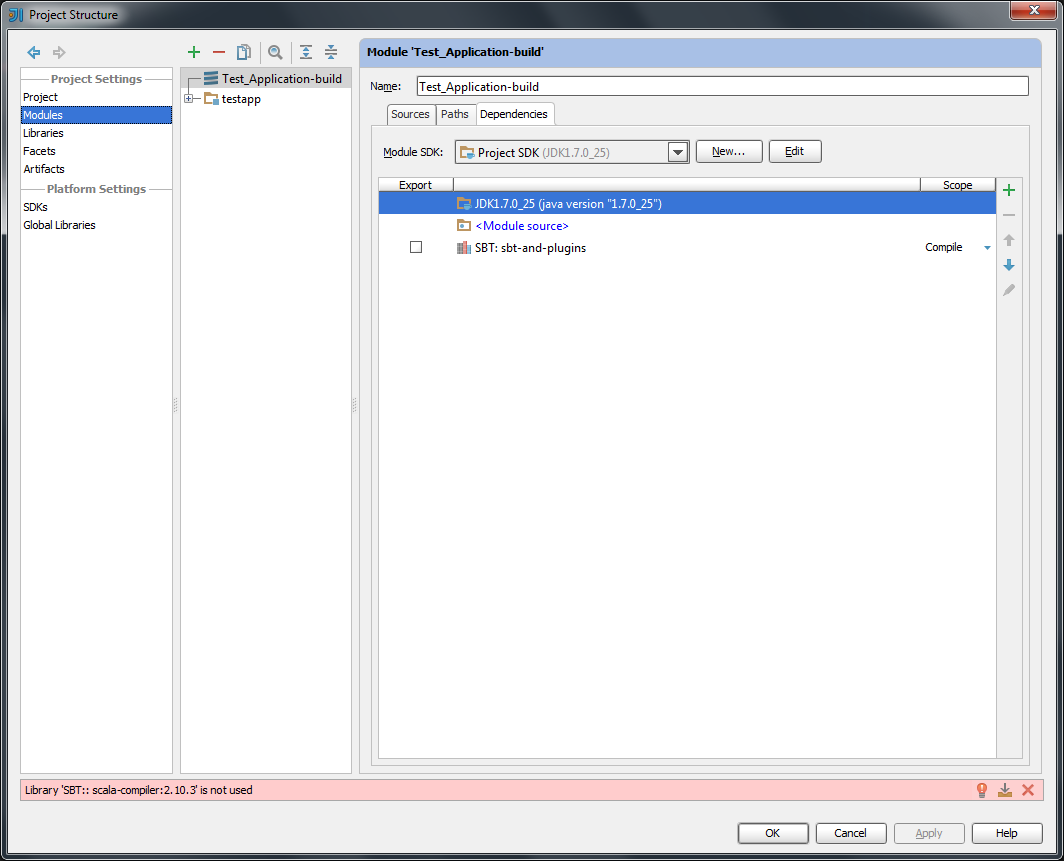
Module Naming Conventions for Play 2.2 and IntelliJ 13.1
Say you create a project using the following method:
1. Create a new app using the play new command (testapp)
2. Naming the application (Test_Application)
3. Selecting the Simple Java application template
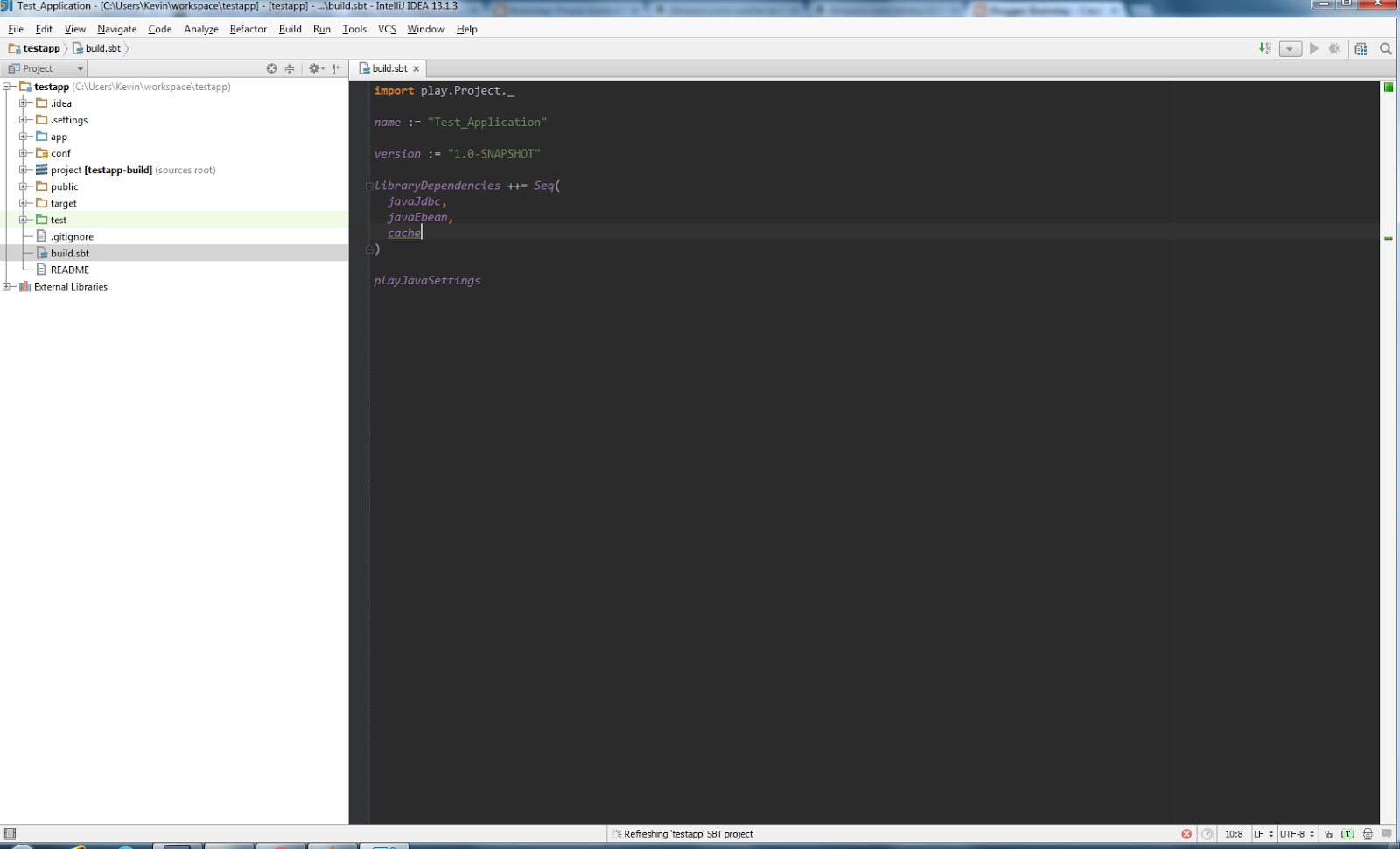
When you open the project with IntelliJ and look at the build.sbt file, this is what you see:
Tuesday, June 03, 2014
Proper build.sbt Settings for Play 2.2 and IntelliJ
For example the snippet:
public static Result login() {
ok(login.render(Form.form(Login.class)));
}
will compile and run, but IntelliJ will flag it as an error because it says that it found a play.data.Form object when the Scala template was expecting a play.api.data.Form object. Now that's just the tip of the iceberg, I even found that in some cases my routes (for redirects within the controller) were flagged as unresolvable objects.
Fear not, for the solution is simple. Your build.sbt file will look like this when Play generates the project:
name := "testapp" version := "1.0-SNAPSHOT" libraryDependencies ++= Seq( javaJdbc, javaEbean, cache ) play.Project.playJavaSettings Simply change it as follows: import play.Project._ name := "testapp2" version := "1.0-SNAPSHOT" libraryDependencies ++= Seq( javaJdbc, javaEbean, cache ) playJavaSettings
Run the following commands:
play clean play compile
And voila! Those nasty red squiggly lines are gone.
Bug notes
This bug was present in the following software and their versions:
IntelliJ IDEA version: 13.1 IU-135.475
Play Framework version: 2.2.1 - 2.2.3
Play 2.0 plugin version: 0.33.404
Scala plugin version: 0.33.403
Sunday, November 03, 2013
GTA; The Lost and the Damned Final Thoughts
After playing and completing it though, I have to say I really like it. My initial critiques still stand, but the overall story, pacing and gameplay is perfect for busy people who enjoy the engaging narrative of a full Grand Theft Auto game without the investment of time needed to unlock all the cool toys and see the entire city.
Now I was never a fan of the whole death metal, leather jacket, biker scene so it was a bit difficult for me to get into the story and start caring about the characters even with such an exciting and edgy trailer...
But once I did my regrets were zero.
I'd describe this as a perfect day-off experience. Long and involved enough to keep you occupied all day but short enough to allow you to get to the conclusion of the story before the sun sets.
Wednesday, October 30, 2013
Running Play 2.1.x App as Windows Service (Fat Free Version)
In this post, I'll show you how to run your Play 2.1.x app silently as a background service and give you a couple tools you can use to ease the administration process for your app. All of this without the use of third party tools.
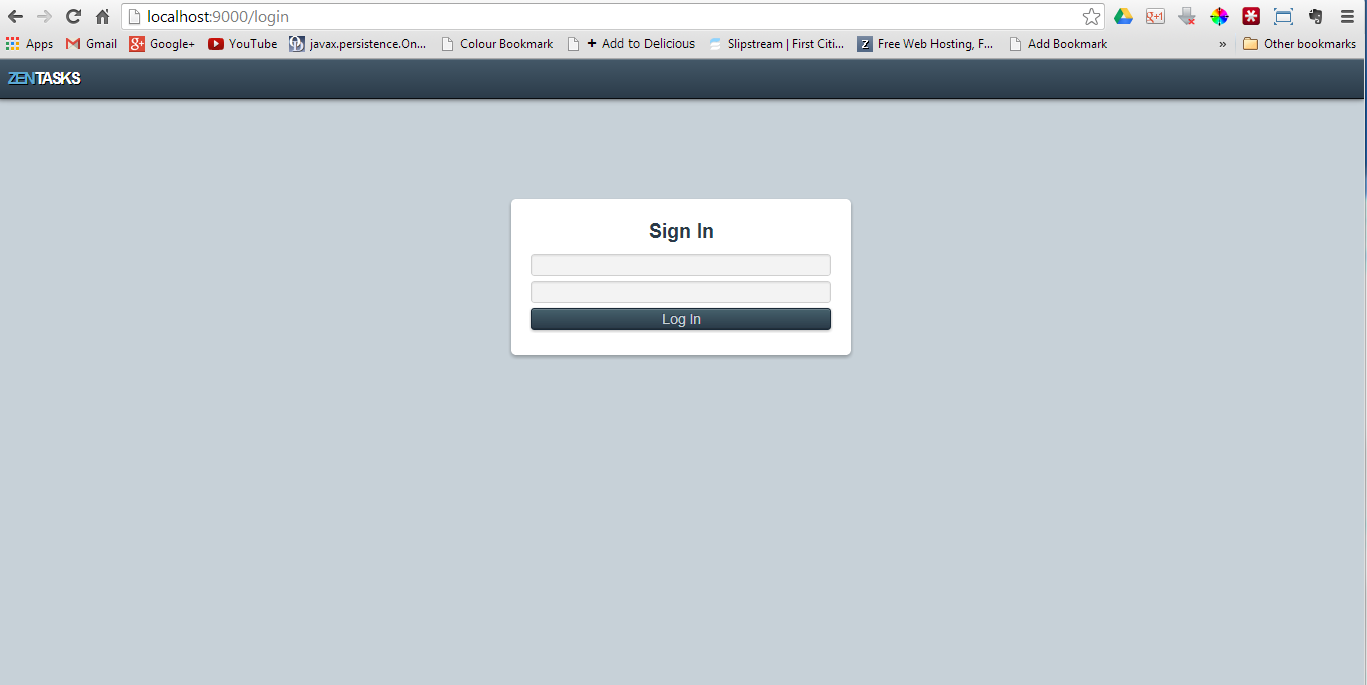
For this tutorial we will use the Zentasks sample application that came bundled with the framework. This tutorial assumes that:
- The zentasks project folder is located in C:\apps\zentasks
- The Java executable is located at C:\Program Files\Java\jdk1.7.0_25\bin\
Adjust these directories to suit your needs. Let's get started.
The Problem
You have several apps that you need to deploy in a production Windows environment, but you hate having the pesky command prompt window visible in the background when you run play start for each application. You want your apps to run silently as Windows services on startup.
The Solution
Create a standalone distribution of your app by opening a command window and running
cd c:\apps\zentasks
play clean dist
In the dist folder of the application directory, you should see an archive named zentasks-1.0-SNAPSHOT.zip Extract the contents of that archive to the current folder.
In my case the location of my app is C:\apps\zentasks and the location of the folder I just extracted from the archive is C:\apps\zentasks\dis\zentasks-1.0-SNAPSHOT.
To run my app invisibly, I take advantage of the javaw.exe application bundled with my Java installation. This file does exactly what java.exe does but it does it in the background without showing a console window.
Note before continuing: Either turn off evolutions or set them to automatic in the application.conf file. You can do that by following the example here. Once that's done, run play dist again.
In a command prompt window I then run the following commands:
cd c:\apps\zentasks\dist\zentasks-1.0-SNAPSHOT javaw -cp lib\* play.core.server.NettyServer
You'll notice that the command runs and returns you to the command prompt. Give it a couple seconds and go to http://locahost:9000 (or whatever port you set the app to run on) and see if your app is running. It should be.
Once you have that sorted out, let's move on. We're going to create two batch files for starting and stopping the application. Once these files are created we can also place them in the Startup folder on our Start menu to have them execute when Windows starts up.
Batch File #1: Start.bat
Open a Notepad document and paste in the following:
cd . start "" "C:\Program Files\Java\jdk1.7.0_25\bin\javaw.exe" -cp lib\* play.core.server.NettyServer
Substitute the correct paths where necessary and save the file as start.bat in your application's dist\zentasks-1.0-SNAPSHOT directory.
To test the file, open task manager and kill the javaw.exe process,
then go to your application's dist\zentasks-1.0-SNAPSHOT directory and delete the RUNNING_PID file. Now double-click start.bat, wait a couple seconds then go to http://localhost:9000 to check if your app is up. It should be.
Batch File #2: Stop.bat
If starting your app in production mode is now that easy, then stopping it should be too.Again, open a new Notepad document and paste in the following:
set /p pid=<RUNNING_PID taskkill /PID %pid% /F DEL RUNNING_PID
That information goes on three separate lines. Save the file as stop.bat, place it in your app's dist\zentasks-1.0-SNAPSHOT directory and when you run it, it should kill the javaw process that your app is running on and delete the RUNNING_PID file as well. To ensure that your app has been shut down, go to http://localhost:9000 and observe that your app is down. At the end of it all your directory structure is supposed to look as follows:
* zentasks *-- dist *-- zentasks-1.0-SNAPSHOT *-- lib *-- RUNNING_PID *-- start.bat *-- stop.bat
You can now take this folder and plop it down on your production server worry-free. Yay!
Q&A
But what about my configuration options? What if I want to change the port that the application is running on?Simple. In start.bat include -Dhttp.port=xxxx or any other configuration options before the -cp argument. E.g:
start "" "C:\Program Files\Java\jdk1.7.0_25\bin\javaw.exe" -Dhttp.port=9001 -Dconfig.resource=prod.conf -cp ...
Is starting the application this way safe?
As far as I can tell, yes. The long and short of the story is that the command you place in the start.bat file is what is essentially run when you execute play start plus or minus a few directory and Java option changes. +James Ward and the +Play Framework team are free to correct me on this if I'm wrong.
Where will the logs and other necessary files be created? A directory for logs will be created in the dist\zentasks-1.0-SNAPSHOT folder and an application.log file will be placed there. File system h2 databases will be placed in the dist\zentasks-1.0-SNAPSHOT folder.
Where does the application read configuration items from in this mode?
In the lib directory of dist\zentasks-1.0-SNAPSHOT there is a file named zentasks_2.10-1.0-SNAPSHOT.jar If you were to extract the contents of this file, you'd see all the evolutions and *.conf files your created up to the point in time you ran the play dist command.
I hope this was helpful to you. Thanks to +James Ward and the amazing +Play Framework team for all their hard work, and as always thank you for reading.
Wednesday, October 16, 2013
Scheduling Jobs In Play 2
The Play! Framework has moved away from using Job classes with Crontab-like annotations for application level task scheduling. In place of the old model we find heavy use of the Akka system, which operates a bit differently and can take some getting used to if you're accustomed to the CRON/Quartz way of doing things.
Let's get started!
After creating our application, we need to create a Global.java file in the app/ directory. Place the following in the file:
import play.Application;
import play.GlobalSettings;
import play.libs.Akka;
import scala.concurrent.duration.FiniteDuration;
import java.lang.reflect.Method;
import java.util.Date;
import java.util.HashMap;
import java.util.List;
import java.util.concurrent.TimeUnit;
public class Global extends GlobalSettings {
@Override
public void onStart(Application app) {
//Magic goes here
}
}
Before continuing, you should probably take a look at what the Play devs have to say about the use of their Akka scheduler before I give my personal explanation.
Place the following in the onStart method of the Global.java file we just created.
FiniteDuration delay = FiniteDuration.create(0, TimeUnit.SECONDS);
FiniteDuration frequency = FiniteDuration.create(5, TimeUnit.SECONDS);
Runnable showTime = new Runnable() {
@Override
public void run() {
System.out.println("Time is now: " + new Date());
}
};
Akka.system().scheduler().schedule(delay, frequency, showTime, Akka.system().dispatcher());
The above simply allows us to log the current time to the console ever 5 seconds. Not very useful, but it's a start. Run the application and see for yourself.
schedule() Arguments Explained
Before we continue we should probably get a firm grip of the schedule(...) method signature.
delay - How long after the application starts should I wait before running my code?
frequency - After I've run my code the first time, how often should I repeat it?
showTime - A runnable containing the code that is to be run after the delay and at the defined frequency.
Akka.system.dispatcher() - Not entirely sure what this is, but it's needed as the last argument.
Neither of the first two arguments can be changed from within the Runnable body. The delay (and frequency) must be calculated on application start correctly and in such a way that the timing of the job is not affected by application restarts.
Defining a Proper Schedule
Now that we've covered the basics, let's move on to creating a useful schedule. The schedule that we'll create will run a task at 4PM every day.
The first step is to determine the delay i.e. how long the scheduler should wait to execute our task once the application has started. The challenge here is that the calculation of the delay must accommodate random application restarts. Say, for example, we start our application at 8AM, the job should wait roughly 6 hours before it starts, but if at 3PM the need arises for us to restart the application, the delay should be recalculated to 1 hour. We will calculate this delay in seconds for better precision.
I'll be using the Calendar class, but feel free to use JodaTime if you're more comfortable. So let's augment our previous code snippet to calculate this delay:
Long delayInSeconds;
Calendar c = Calendar.getInstance();
c.set(Calendar.HOUR_OF_DAY, 16);
c.set(Calendar.MINUTE, 0);
c.set(Calendar.SECOND, 0);
Date plannedStart = c.getTime();
Date now = new Date();
Date nextRun;
if(now.after(plannedStart)) {
c.add(Calendar.DAY_OF_WEEK, 1);
nextRun = c.getTime();
} else {
nextRun = c.getTime();
}
delayinSeconds = (nextRun.getTime() - now.getTime()) / 1000; //To convert milliseconds to seconds.
Code explanation:
Calendar c = Calendar.getInstance(); c.set(Calendar.HOUR_OF_DAY, 16); c.set(Calendar.MINUTE, 0); c.set(Calendar.SECOND, 0); Date plannedStart = c.getTime();
Use a Calendar object and set it's time to 4PM of the current day, then create a date object to store the current date and the intended start time based on the modified Calendar object.
Date now = new Date();
Date nextRun;
if(now.after(plannedStart)) {
c.add(Calendar.DAY_OF_WEEK, 1);
nextRun = c.getTime();
} else {
nextRun = c.getTime();
}
Find out the current date and time (now) and create a new Date object (nextRun) that will store the date and time of the next code execute.If the time now is after the time we planned to start the job, then we'll set the time that the job should execute to be tomorrow at 4PM. If not then we're on schedule and the nextRun will be today at 4PM.
delayInSeconds = (nextRun.getTime() - now.getTime()) / 1000; //To convert milliseconds to seconds.
Next we do some simple subtraction to find out how many seconds between now and the next time the code should run. This is our delay... In seconds, of course.
From here on it's gravy. Simply substitute the delayInSeconds value for the integer value in the FiniteDuration delay variable and change the frequency to 1 day as follows:
FiniteDuration delay = FiniteDuration.create(delayInSeconds, TimeUnit.SECONDS);
FiniteDuration frequency = FiniteDuration.create(1, TimeUnit.DAYS);
Runnable showTime ...
Altogether Now!Long delayInSeconds;
Calendar c = Calendar.getInstance();
c.set(Calendar.HOUR_OF_DAY, 16);
c.set(Calendar.MINUTE, 0);
c.set(Calendar.SECOND, 0);
Date plannedStart = c.getTime();
Date now = new Date();
Date nextRun;
if(now.after(plannedStart)) {
c.add(Calendar.DAY_OF_WEEK, 1);
nextRun = c.getTime();
} else {
nextRun = c.getTime();
}
delayInSeconds = (nextRun.getTime() - now.getTime()) / 1000; //To convert milliseconds to seconds.
FiniteDuration delay = FiniteDuration.create(delayInSeconds, TimeUnit.SECONDS);
FiniteDuration frequency = FiniteDuration.create(1, TimeUnit.DAYS);
Runnable showTime = new Runnable() {
@Override
public void run() {
System.out.println("Time is now: " + new Date());
}
};
Akka.system().scheduler().schedule(delay, frequency, showTime, Akka.system().dispatcher());
Now every day at 4PM your application will remind you of the time. Awesome.
Thanks very much to +James Ward and this magnificent post for helping me wrap my head around this tricky concept. Thanks to the +Typesafe folks for all their hard work with the +Play Framework , and as always thank you for reading.
Wednesday, October 02, 2013
How to Install Play 2 War: The Bare Minimum
This project is a module for Play framework 2 to package your apps into standard WAR packages. It can be used with Servlet 3.0 and 2.5 containers (Tomcat 6/7, Jetty 7/8/9, JBoss 5/6/7, ...)Step 1: Add the Plugin to plugins.sbt
Navigate to
addSbtPlugin("com.github.play2war" % "play2-war-plugin" % "1.0")
Note: Be sure to include an empty line between this line and the previous addSbtPlugin statement.
Step 2: Add Play2War keys to Build.scala
In the same folder as plugins.sbt, you'll find the file Build.scala. Open this file and follow the template below for modifying it. Items in bold are the new lines that were added. Items in italics are items that can be modified to suit your application's needs.
import sbt._
import Keys._
import play.Project._
import com.github.play2war.plugin._
object ApplicationBuild extends Build {
val appName = "your_app_name
val appVersion = "1.0-SNAPSHOT"
val appDependencies = Seq(
// Add your project dependencies here,
javaCore,
javaJdbc,
javaEbean
)
val main = play.Project(appName, appVersion, appDependencies)
.settings(Play2WarPlugin.play2WarSettings: _*).settings(
// Add your own project settings here
Play2WarKeys.servletVersion := "3.0"
).settings(
Play2WarKeys.targetName := Some("war_file_name
)
}
Tip: The full list of Play2WarKeys and their expected data types can be found here.
Step 3: Resolve Dependencies and Build the WAR
Open a command terminal and cd into your project's directory. Once there, run the following commands:
play
clean
dependencies
war
Once the war command has completed you can look in
Why Would I Want to Use This Plugin?
That's a great question especially seeing that Play comes with its own high performance web server built in. My answer to that question is if you work in a Windows-centric environment like mine, you become acquainted with the "shortcomings" of the Play framework when it comes to production deployment in a Windows environment. Unlike Linux where you can easily set your application to run as a service in the background on startup, Windows forces you to resort to all sorts of .bat magic that leaves you with a bunch of command line windows popping up and having to stay open for the duration of the application's life.
So for a cleaner, less cluttered production server that other members of your team can appreciate, I recommend using a Servlet container like Tomcat that can be installed as Windows service and set to run on startup. No more .bat magic and no more freaking out when the server admin says he restarted the server a couple hours ago and now the folks in HR can't access the employee registration application.
Closing Remarks
In all, the installation of this extension was easy once you figured out how to switch mental context to deal with the different syntaxes for each file that has to be manipulated. I find that in some cases the author of the documentation could have gone into a little more detail in addressing the little gotchas with each file type. For example the need for an empty space between lines in the plugins.sbt file. Thankfully the Play command was smart enough to point this out to me when I tried to start the application and it was an easy fix.
That being said, though the installation of this particular plugin was not all that difficult, I would still like to see some more abstraction in the plugin installation process. I think the guys over at +Typesafe could take a very interesting page out of the Rails book in this regard.
That's it for now. I hope this article was useful.
Wednesday, September 25, 2013
Styling Apps In Android - Not for the Faint of Heart
Coming from a Web/CSS background, I was expecting things like drop shadows, gradients, rounded corners, selective border colours etc. to be relatively easy to implement. As it turns out, it's not. For example, getting rounded corners on an ImageView involves a fair amount of coding (as illustrated here: http://stackoverflow.com/questions/16208365/create-circular-image-view-in-android). It's especially hurtful when doing the same in iOS is so headslappingly simple http://stackoverflow.com/questions/7705879/ios-create-a-uiimage-or-uiimageview-with-rounded-corners I just wish making my apps look cool was a much easier process.
Anyway, if anybody feels the same way, knows of easier ways to achieve aesthetic gold or if the styling and graphics APIs are supposed to get a reboot anytime soon, sound off in the comments below.
Sunday, August 25, 2013
Play Framework 2.x - Taking the Plunge
So after many months of kicking and screaming against being forced into the new 2.x.x branch of the Play! Framework I finally decided to take a weekend and learn the damn thing and get it over with.
Pros
Much more powerful and feature packed than the 1.x branchIn addition to some serious code optimizations and refactorings, things like an interactive console, built in H2 in-memory database browser and a built-in LESS and CoffeeScript compiler are just a few of the bells and whistles added on that really add to the development experience.
The Scala templating language is not as scary as it sounds
...And that's coming from a Java developer. Yes, I really enjoyed using this templating system even though some things took a couple minutes to really sink in. Parameter groups? What's that?
The new ebean ORM
Though I've only used it to complete the Zen Tasks tutorial, i'm seeing that it requires a lot less hand-holding in the JPA annotation department. Give it a @ManyToOne annotation in one class and you don't need to go to the related class and set up the mappings. It's something I haven't seen done anywhere else (except Rails, I think) and it's nice to see it available here in sweet ol' Java.
Cons
Not as friendly, free form an "playful" as the 1.x branch.Doing the simplest of things requires a lot more typing, planning and thought now. Gone are the days when I could have just done this:
public static void updateUser(User user) {
user.save();
render();
}
Now I have to do:
public static void updateUser() {
Form
User u = userForm.get();
u.save();
ok(views.html.users.updateUser.html);
}
This approach provides certain advantages, but it really takes away from the appeal and fun I had with the 1.x approach.
Documentation is a bit lacking
I wish the documentation could have been organized better and be more detailed a la 1.x. Certain sections like Forms and Action Composition could use a little attention.
Searching for help turns into a hunt
Searching for help online usually returns 1.x or 2.x Scala results. This is not helpful to a 2.x Java developer.
Other Thoughts
I've been a big fan of the +Play Framework since I walked away from Rails over a year ago. I haven't looked back since. Part of what made me fall so madly in love with it was it's power without being verbose; elegant simplicity without the need for me to get embroiled in XML files and the like. I could have hardly believed it was Java I was using!
As of late though, it's become a bit heavier and less of a tool that I could use to knock out a prototype in no time flat. Don't get me wrong, it's still miles better than Spring or Struts (shudder), but it's just not as free form and delightful as it was when it was younger. I do understand, though, that some of its "agility" was sacrificed to introduce better optimized code and more powerful technologies, so I guess I'll just file this under the price of progress.
Conclusion
Sunday, May 26, 2013
Why I Am Choosing the Playstation 4
Now before I begin, I must declare that this post is not titled why you should choose the Playstation 4, but why I am making it my companion for my next romp in the Elysian fields of console gaming.
Why the Playstation 4?
When that next MGS/Uncharted/The Last of Us drops, I want it IMMEDIATELY.
What's Wrong with the Xbox?
Currently though, Halo just isn't my thing and the new Xbox One's slew of living room features just don't make a compelling enough case for me to pick this thing up on day one.
You Fool! PC is Where It's At!
And you maybe right, more so in this console generation than ever. For those of you who aren't acquainted with each system's technical specifications, these new systems are basically just PCs with a smaller form factor and features that make them more suitable for your living room than for editing PowerPoint presentations.
Be that as it may, I have a very awful taste in my mouth regarding PC ports of last generation's games. I found that far too often I had to become this great PC hackboy to get some of my favourite games to work well. When it wasn't replacing particle files to fix visual glitches, it was simply a case of poor PC optimization on behalf of the developers. I'm looking at you GTA 4.
Worse yet, all of my PS2 faves like Vice City and San Andreas just didn't carry over well once I started getting more modern hardware for my PC. I actually had to install a video card "hack tool" to get them to play properly on my Radon 6670. Not to mention the laughable support for more recent joypads.
These are issues that console gamers simply don't have to worry about, but were my nightmare almost every time I installed a game that was ported from the consoles to PC.
Sure you can throw the argument about better graphics and modding ability at me, but the truth is I never really cared for mods and I remember enjoying Vice City immensely on the PS2 in all it's buggy and glitchy glory. I'm prepared to sacrifice a bit of visual fidelity for the sake of a hassle-free gaming experience.
Now it may be safe to conclude that the source of all of the last generation's PC ports were so terrible due to the Playstation 3's Cell processor and that this generation's ports may be much better due to the fact that both consoles are using more standardized PC-like hardware, but that remains to be seen.
I may still end up build a gaming PC to catch the odd game or two that are "tremendously better on PC" but i'll be taking my time with that project.
In conclusion/TLDR:
- I'm choosing the PS4 because I like the exclusives.
- I'm not choosing the Xbox One because I don't really care for that platform's exclusives.
- I'm not choosing PC (from the get-go) because of the terrible console ports of last generation.
- You are free to decide which one you want to go with.
Thursday, January 17, 2013
Today I Fed A Man
Walking in to my new neighbourhood convenience store, I caught a whisper of a beggar asking me for some change. I mostly ignored him and continued on.
While inside the store his voice ricocheted around the inside of my head like a vindictive stray bullet. I wrestled with logic and my humanity as I weighed the pros and cons of giving this beggar some money - if I give him cash he'll probably spend it on drugs, so maybe I should default and give him some food instead.
By the time I came to this conclusion I was already out the store, groceries in hand.
I saw him looking at me expectantly, all the while counting up some singles and fives; his day's take I guess.
To put an end to this absurdly long thought process I just reached into my pocket and handed him two of the singles that happened to be in there. He accepted it graciously.
A few minutes later, my short term memory kicked back in and reminded me that I needed some matches. There was a small parlour across the street,so there I headed to make my last purchase.
As I'm standing by the counter counting my pennies, up comes the beggar behind me and with the fives and singles he was counting, purchased a small loaf of bread, a snack and a drink. He then looked at me, the delight in his eyes shining through his bushy eyebrows, and said "thank you brother!"
At that point I swore I could feel the Holy Spirit smiling at me and nodding in approval. Best feeling I had all day knowing that I fed my saviour.
Friday, December 07, 2012
It's About Doing Something Good
I was saved from this torment twice and now I think it's time I return the favour to my countrymen.
Friday, November 30, 2012
Fixing a Problem
As humongous or diminutive as problems might be I believe that the solutions to them come about by chipping away at the issue in a very incremental manner. It just takes time and a fair amount of consistency, but eventually the problem will dissolve.
But what about this case - what do you do in a case where the solution to the problem is so simple, yet the people for whom you are solving the problem are too paranoid and distrusting for them to even dip their toe in the solution unless they see someone else drinking the proverbial Kool-Aid first? What do you do then? What becomes of the problem? Can it still be classified as a problem since nobody seems to want it solved or everybody balks at the presented solution?
There is a culture in my country that says no solution (or product in a general sense of the word) is any good unless millions have been spent in creating it is presented with lavish press conferences and promotional campaigns. I honestly find this highly annoying and it shows where we are as a people in terms of our mental development.
I'm daring to change that culture and see if I can bring my country even one step closer to the 21st century. That's why I'm challenging myself to fix a problem that plagues everyone in my country, and i'm going to fix it with a budget of $20USD and I want to see how my countrymen react to it. It's going to be practical, free and simple to use. Let's see how it goes.
Thursday, August 23, 2012
jQuery QR Code Generator
It's called jQuery QR Code and it's written by Jerome Etienne. Take a look at his GitHub project and tell me what you think. This will definitely come in handy on my current project!
Saturday, March 03, 2012
Fixing Ubuntu Issues: No Wireless on Reboot
In recent times it has not been uncommon for Ubuntu to not be able to connect to my wireless network on boot up, so I did some digging and found out that the problem was that the Automatic DHCP IPv4 settings were to blame. My solution: use manual IPv4 configuration. Here's how.
My internet set up is as follows :- My modem is connected to my wireless router which propagates the signal that my PC's USB wireless adapter receives. There's plenty of networking going on there, (something I am not the best at) but I do know that finding out the IP addresses of my various pieces of network hardware will be the key.
So on my Windows machine i ran ipconfig and found out those addresses:
192.168.1.1 - My modem's address
192.168.2.1 - My wireless router's address (Default gateway)
192.168.2.5 - Address of PC
255.255.255.0 - Subnet mask
I took those settings over to Ubuntu, opened the network manager by clicking the Wireless icon in the top task bar, selecting Edit connections... > Wireless > FBI_VAN_467 (My SSID) > Edit... > IPv4 Settings and entering the information as follows:
I chose a random non-conflicting IP address for my Ubuntu PC's address, used my wireless router's IP address for my default gateway and set my DNS server address to my modem's address.
After that it worked like a charm. I hope this helps!
Thursday, March 01, 2012
New Search Engine - DuckDuckGo
Now, anybody who knows me knows that I'm a G-Man (Google Man) through and through, but honestly i've not been to happy about their recent skirmishes with the law when it comes to people's privacy and the extent to which they will go to get your personal information so that they can target ads to better suit you.
Truthfully I was never a fan of the idea that I was being herded and processed by a big company that was going to use my personal information, my likes, dislikes, hobbies - my personality - to make money, but I had to tolerate it because it was the companies behind some of the best internet services that I use were doing this.
Now there's a new duck in the search engine pond and this one is more morally secure and less thirsty for money and is doing... just fine! I'm talking of course, about DuckDuckGo.
| Google Search Results |
| Results from the Duck |